I Built an Arduino MIDI Foot Controller: the OpenMIDIStomper
Build and configure the OpenMIDIStomper Arduino MIDI foot controller: eight banks, a switch matrix, expression inputs and browser-generated message presets.
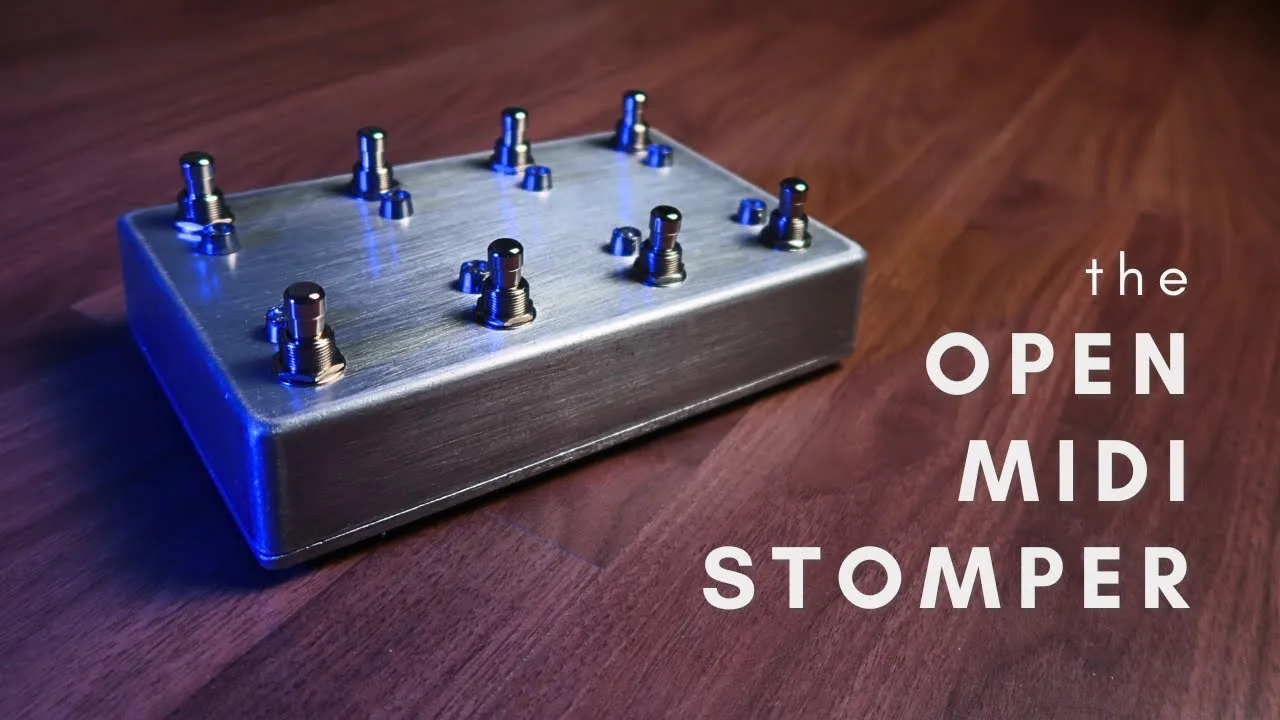
A foot controller lets you change sounds and trigger actions while your hands stay on an instrument. I built the OpenMIDIStomper as an open-source Arduino MIDI foot controller with eight switches, eight LEDs and two expression-pedal inputs. The electronics fit inside a Hammond aluminium enclosure, and an Arduino Pro Micro provides the USB MIDI connection.
The physical layout is deliberately small, but the configuration is larger than eight commands. Banks and multiple messages per switch let the same pedalboard serve different songs, plugins or performance tasks. This Arduino MIDI project can also act as a template for another pedal layout, provided its wiring and firmware configuration are changed together.
Eight banks without 64 physical switches
The firmware has eight banks of eight switch assignments. Hold a switch for about one second to select its bank; the LEDs show which bank is active. A bank changes what the switches send, so eight physical controls provide 64 assignment positions.
The normal message is sent when you release a switch in the demonstrated firmware. That is a deliberate design choice: it leaves time to distinguish a tap from the hold used for changing banks. If you are using the pedal for timing-sensitive actions, understand that release behaviour before mapping the controls.
Each switch can send up to five configured MIDI messages. For example, a single assignment can combine a note with a Control Change and a Program Change. What the receiving plugin does with those messages depends on its mapping and MIDI implementation; USB MIDI gives the connection, not an automatic preset for every device.
A button matrix leaves room for LEDs and expression
Connecting eight switches, eight LEDs and two analog inputs individually would exceed the available pin budget in this design. The switches are therefore wired in a matrix: rows connect one group of terminals and columns connect the other. The firmware identifies a switch from its row/column intersection.
The sketch contains the row count, column count and pin assignments. Those settings must match the circuit. Changing the number of switches in a DIY MIDI controller also means revisiting the matrix and the configuration, rather than only changing the enclosure holes.
Each LED has its own digital output and a series resistor; the demonstrated circuit uses 220 Ω resistors. A larger resistor reduces brightness in the comparison. Use the actual circuit documentation and component ratings when building a variant.
The quarter-inch expression inputs are wired as potentiometer inputs. Check the jack connections and pedal wiring against the project’s schematic before connecting an expression pedal. The enclosure drilling template is for the Hammond model used in this build; another case needs its own dimensional checks.
Install the firmware dependencies
The project package shown includes the Arduino firmware, browser editor, schematic, enclosure files and presets. Its wiki explains the circuit and code settings. The libraries discussed include MIDIUSB, ResponsiveAnalogRead and a USB-renaming library that gives the device its OpenMIDIStomper name.
Open the firmware sketch in Arduino IDE, install its dependencies and select the board and USB port that match the Pro Micro setup. Check the row/column, LED and expression settings before uploading. The browser editor is a separate part of the workflow: it prepares the message configuration that you then put into the sketch.
Configure a bank in the browser editor
Choose a bank and then a switch. The editor exposes up to five message slots for that assignment. Select the message type and its number, value and channel as applicable. The demonstrated options include notes, Control Change, Program Change and a note-toggle behaviour that alternates state between presses.
Leave unused message slots at −1 in this configuration format. That disables the slot instead of sending an unwanted extra message. When entering channels, pay attention to the editor’s zero-based numbering: 0–15 corresponds to the familiar MIDI channel display 1–16.
After editing:
- Copy the generated configuration to the clipboard.
- Open the MIDI-message configuration area of the Arduino sketch.
- Replace the intended configuration content inside its braces with the generated data.
- Upload the revised firmware.
- Open a MIDI monitor and check the message types, numbers and channels for the switches and banks you edited.
This is configuration through generated firmware data. It is not a claim that the browser changes the connected pedal’s memory instantly without an upload.
Save and reuse presets
The editor exports a bank configuration as a text file. You can import that file into another bank, then repeat the copy, paste and upload process. This is useful when several plugins or songs need different assignments: keep a named bank file for each mapping rather than rebuilding all its entries from memory.
The video demonstrates both editing individual switches and importing an existing preset, then verifies the result in a MIDI monitor. That final check catches channel-numbering mistakes and confirms that unused slots have not added extra commands.
For a guitarist, the value is having repeatable actions underfoot. For a builder, it is seeing how the matrix, bank logic, LEDs and configuration editor work together. Start with a small verified mapping, then expand it into the set of actions your actual performance needs.