How I Built This DJ MIDI Controller – Traktorino 2.0 Prototype
Follow an Arduino DJ MIDI controller prototype through PCB assembly, switch clearances, fader footprints and the mechanical fixes needed for the next revision.
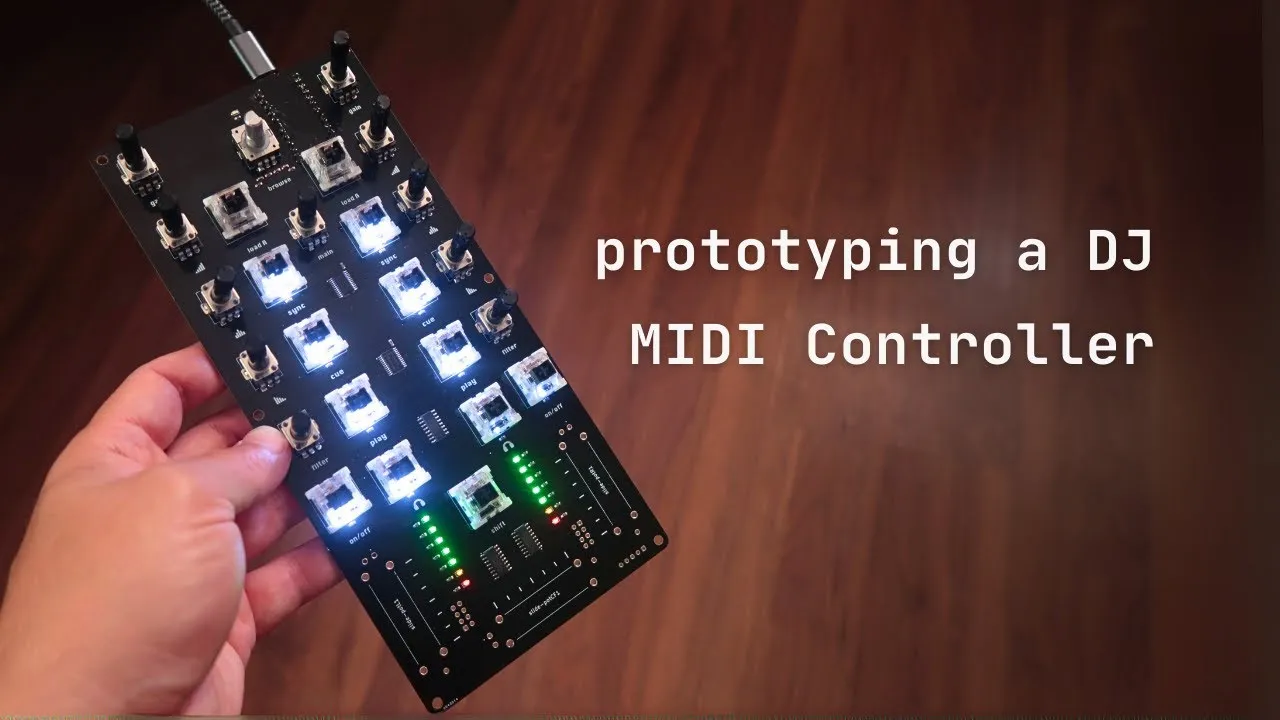
This Arduino MIDI project shows how component choices affect assembly as much as the controller’s musical layout. This version is designed as a DJ-oriented MIDI surface, with an Arduino Pro Micro, mechanical switches, potentiometers and a rotary encoder. The video documents a prototype and the corrections it prompted; it is not a finalized assembly manual.
Controls are chosen for a DJ workflow
The mechanical switches are intended for actions such as play, cue and loading tracks. The rotary encoder browses a library, with its push function used to confirm or navigate folders. Potentiometers can be assigned to EQ bands, a filter or other software parameters. The controller is designed around Traktor, but the creator notes that MIDI controls can be mapped in other DJ, music-production and mobile software as well.
The prototype’s PCB arrived with its surface-mount components—such as LEDs, resistors and bit shifters—already installed. The larger through-hole controls still required soldering. This split was intended to make assembly easier by leaving the user with larger parts to install.
Prototype findings that changed the design
The switches did not fit tightly in the first PCB, so the mounting holes needed adjustment. The creator also found soldering the Pro Micro directly to the board awkward because nearby parts left little working room. A future revision was planned with more space around the board. During soldering, heat also melted part of a potentiometer’s plastic shaft; that mistake illustrates why the iron’s contact point and dwell time matter, though the video does not provide a detailed soldering procedure.
The slide potentiometers were not installed in this prototype. The creator had not received them in time and planned to change their footprint to a part that was easier to find and less expensive. Translucent keycaps were added over the illuminated switches so light could show through; their colors in the demonstration were random test choices, and a supplier for the preferred style had not yet been found.
What the prototype can and cannot tell you
The video gives concrete design feedback: verify switch fit, allow soldering clearance around the microcontroller, and choose a slide-pot footprint based on parts that can actually be sourced. Those are useful lessons for a custom MIDI controller, but exact PCB files, dimensions and a complete bill of materials are needed to reproduce this board. Prototype details may also differ from later revisions.
The creator describes the Traktorino as an open-source project and planned a Traktor mapping. Treat the video as a record of this stage, not confirmation of present availability or current software compatibility.
The finished Traktorino 2.0 overview shows how the project developed after this prototype. Comparing the two is useful when planning a DIY MIDI controller: the layout may stay familiar while clearances and assembly details change substantially.