TRAKTORINO All you Need to Know! The Arduino DJ open-source MIDI Controller (Edited Live Session)
A practical tour of the Traktorino DJ MIDI controller: deck controls, mixer, encoder layers, LED feedback, USB MIDI, and modular open-source construction.
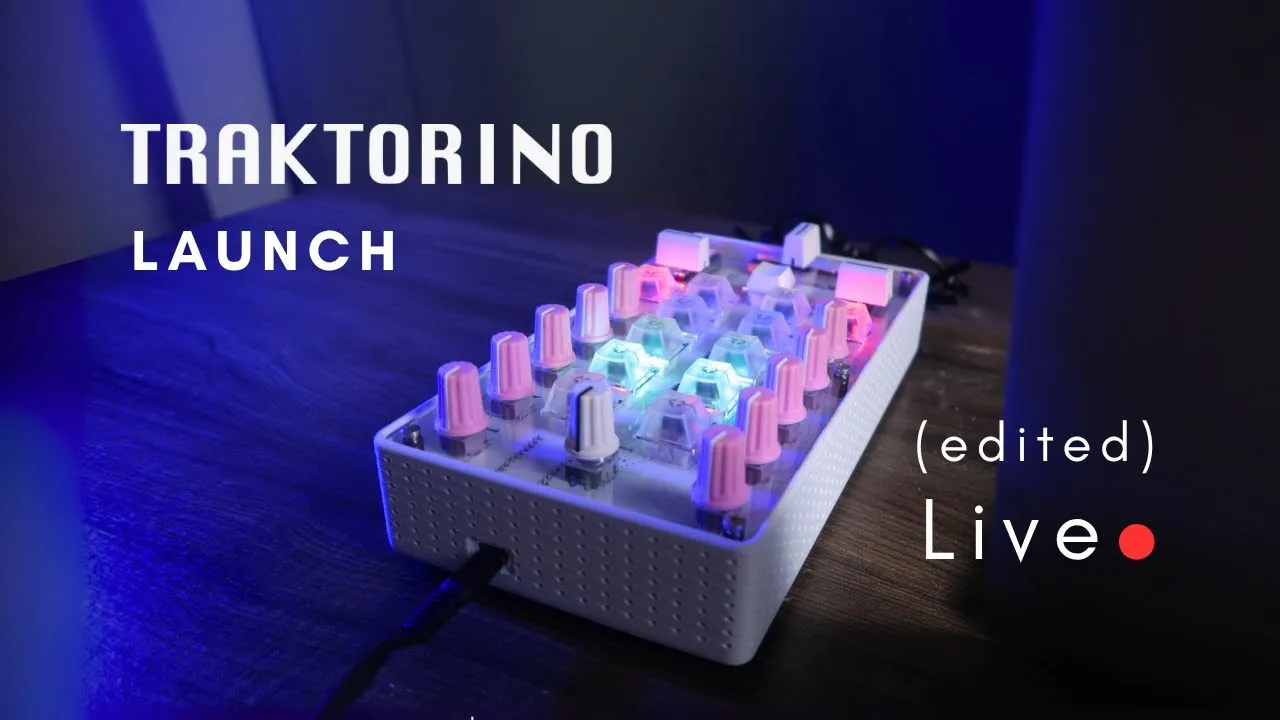
Traktorino puts common two-deck DJ actions on a compact MIDI surface: load and play tracks, adjust channel levels and EQ, blend with a crossfader, and browse with an encoder. This edited session is best read as an operating and architecture tour. The separate Traktorino Crowdfunding Launch LIVE focuses on the launch decisions and audience Q&A.
Start with the deck workflow
The controller has a mixer-style layout intended mainly for Traktor, while remaining a general MIDI surface that can be mapped to other software. In the demonstration, the rotary encoder scrolls through the music library. Its push action changes browsing context, so the user can move between selecting tracks and navigating folders. Once a track is selected, the Load A and Load B buttons send it to the corresponding deck. A Play control starts playback, and Sync aligns the decks when that is useful to the set.
Each channel has a volume control and three EQ potentiometers for high, mid, and low frequencies. A filter control is available as well, but the demo shows that it must be enabled before its movement affects the sound. The crossfader then blends between the two channels. These controls map familiar mixer gestures to software actions, reducing the need to move between the controller, keyboard, and mouse during a transition.
The session also illustrates that not every DJ needs another physical wheel. Holding Shift and using the encoder with a deck control can provide jog-style movement. The mapping can move in beat-sized steps or more continuously, depending on the chosen behavior. The encoder is therefore doing two jobs: navigation when preparing a track and a performance control when the modifier combination changes its role.
How the controls reach the software
At the center is an Arduino Pro Micro connected over USB-C. The controller is described as USB MIDI class-compliant, so a computer recognizes it as a MIDI device without a separate power supply in the demonstrated setup. MIDI messages travel from the controls to the DJ software. For illuminated feedback, the relationship also goes the other way: Traktor sends MIDI feedback to the controller so LEDs can reflect a button’s state.
Two multiplexers expand the available inputs. The Pro Micro does not have enough pins for all the physical controls on its own; each multiplexer adds 16 inputs. That expansion supports the buttons and potentiometers without requiring a larger microcontroller board. The edited walkthrough focuses on how the assembled controller behaves, rather than providing a pin-by-pin wiring tutorial, so use the project’s circuit files for exact connections before building or modifying the electronics.
This input-and-feedback model explains why the controller’s LEDs are more than decoration. A button can send a command such as play, while its light can indicate whether that command is active in the software. For a DJ, that distinction is useful when a control is a toggle or when a software state can change outside the physical button press.
Set the button colors and brightness
The translucent keycaps allow the LEDs below them to show through. To edit the palette, hold Shift, Load A, and Load B together for three seconds. The controller enters color-editing mode; turn the encoder to change hue, then assign the selected color to the desired buttons. Brightness can be set separately for an active LED and an inactive LED. This lets the user make the current state obvious while keeping the resting controls dimmer.
When the palette is set, press the encoder to save it to memory. The walkthrough unplugs and reconnects the controller to show that the chosen colors return. This is a direct, hardware-side configuration flow, not a setting that must be changed in the DJ software each time. For the complete key sequence and color operation, see Traktorino color editing mode.
The Shift button adds another layer to the surface. While held, other controls can access alternate assignments: the potentiometers can control an effect instead of their normal EQ role, and the encoder can browse or perform a jog function. Releasing Shift returns those controls to their primary use. This keeps the device compact while giving a DJ access to more commands than there are dedicated buttons. See Traktorino Shift button for the modifier workflow.
One limit is explicit in the edited session: the crossfader curve cannot yet be adjusted from the demonstrated controls. The creator says that such an adjustment could be added in code, which frames it as a future possibility in that recording, not an existing feature. Likewise, the session’s broader mention of modular expansion should not be read as proof that every add-on module is already available.
Read the enclosure as a modular assembly
The board and enclosure are designed so that some fabrication can happen locally. The demonstrated assembly uses an acrylic top panel, a bottom layer, and spacers; the electronics board sits between the enclosure pieces. A 3D-printed structure is an optional part that attaches to the other layers. It is not a complete freestanding case by itself in the version shown. The panels can be laser-cut, and spacers or mechanical hardware can be sourced separately, allowing a maker to choose a finish and fabrication route.
This construction follows the project’s cost and assembly rationale. Small surface-mount components are installed on the PCB in the factory, while larger controls are suitable for user assembly in the more hands-on option. Another path is a populated board with less soldering. The session discusses different kit configurations, but those were launch-era arrangements; check current project documentation for the actual files, parts, and assembly sequence. It does not provide a complete bill of materials or detailed soldering guide.
What this overview supports
The Traktorino combines a DJ-oriented control layout with USB MIDI, LED feedback, layered encoder/Shift assignments, and an enclosure that can be adapted to local fabrication. The edited session demonstrates practical operation and explains the architecture behind those actions. It is useful if you want to understand how a compact controller can cover deck loading, playback, EQ, filtering, browsing, and jog-style movement.
It does not establish universal compatibility or supply every mapping for other applications; MIDI assignments depend on the receiving software. Nor should launch-era kit or fulfillment statements be treated as current.