REACTING to the 2025 MIDI INNOVATION AWARDS
Explore all ten projects in this MIDI Innovation Awards 2025 reaction, including Anukari, DataBass, Morphonium, Azoteq, Demon Box and Roto-Control.
A MIDI controller can be a watch, an altered bass, a set of wheels or a kinetic installation. The 2025 MIDI Innovation Awards bring those approaches together with software and commercial instruments. For this reaction, I selected ten entries that caught my attention across the categories, then chose personal favourites within that selection.
The useful question is how each interface makes a musical idea playable. Some projects capture a gesture in an unusual place. Others rethink how sound is generated or how a performer receives feedback. Here are the ten examples and the decisions worth taking into your own instrument design.
1. 8ight Note: physical rhythm, light and movement
8ight Note is a kinetic magnetic MIDI controller. The demonstration uses magnetic balls and a moving track panel to create evolving rhythms and visual patterns. The physical arrangement, movement and lighting form one interaction rather than separate decorations around a conventional sequencer.
This is close to what first drew me into DIY music technology: combining things that are difficult to connect with an off-the-shelf instrument. I like the relationship between the unique interface, the sound and the visuals. For an installation, the audience can see part of the musical process rather than only hear its output.
2. MIDIWrist Unleashed: a controller on the wrist
MIDIWrist Unleashed turns an Apple Watch into a standalone Bluetooth LE MIDI controller. The entry shows several panels: knobs operated with the Digital Crown, an XY pad and motion control using wrist or arm movement, rotation and acceleration.
A watch is unlikely to replace an entire performance surface, but it is already located on the player’s body. That makes it an interesting additional source of expression. The different panels also illustrate that a small screen and one physical dial can support several clearly defined interactions.
3. Anukari: design an instrument through physics
Anukari is a synthesizer built around an interactive 3D physics simulation. Instead of starting from an oscillator and filter diagram, you arrange masses and springs and interact with the simulated structure. Microphone placement and the location of an excitation affect the resulting sound.
In the video, I look beyond the short entry clip to its own demonstration because the instrument is easier to understand in use. What interests me is the connection between the model you build and the timbre you get. Changing a physical relationship becomes part of sound design, giving the user another way to imagine a synthesizer.
4. Azoteq: sense the whole keystroke
The Azoteq MIDI 2.0 Full Motion Key Position Sensor Module explores expression while retaining a familiar keyboard action. Its position sensing follows a key through its stroke, making movement available to an MPE or MIDI 2.0 instrument.
That differs from simply detecting the moment a key crosses two velocity switches. The project asks what additional expression can come from measuring the key’s movement. The official entrant description identifies it as a proof-of-concept sensor system; it should not be treated as a universal user-installable upgrade for every keyboard.
For a maker, the idea is to improve the information captured by an interface the musician already knows, rather than always requiring a new playing technique.
5. DataBass: build around an existing musical practice
DataBass combines an upright bass with MIDI control, sample triggering, looping and additional expressive tools. In the performance, percussive playing on the instrument becomes part of the electronic arrangement while the musician continues to play bass.
What I particularly like is that the musical need is audible. The sensors and added controls support an actual performance, rather than existing only as a technical demonstration. Pads and LED rings may be visually unusual on an upright bass, but their role makes sense in the arrangement.
This is a useful test for any DIY MIDI controller: can you explain what it lets the musician do in the music, as well as what electronics it contains?
6. Circle Guitar: sequence the strings
Circle Guitar combines a guitar with a rotating mechanism and MIDI-mappable controls. The demonstration shows control over the mechanism’s speed, individual string levels and a gating interaction associated with its motion.
The result is a specialised instrument with a sequencer-like aspect built into the guitar performance. I like the construction and the fact that it produces a distinct musical behaviour. It need not replace a standard guitar for every song to be valuable; a particular gesture or texture can justify a dedicated instrument.
The reaction does not establish which features changed from the previous awards entry, so the comparison is about the demonstration shown, not a verified revision history.
7. Expression Orchestra: make the audience the ensemble
Expression Orchestra is an installation in which audience members become performers. Its instruments are designed to open access to musical expression in a shared environment.
Here, the central design question is participation: how do people understand what they can do and contribute to a collective musical result? The setting, appearance and interaction are part of the work. An instrument in an installation can have different priorities from a controller built for a single experienced player on stage.
8. Morphonium: give timbre the dexterity of notes
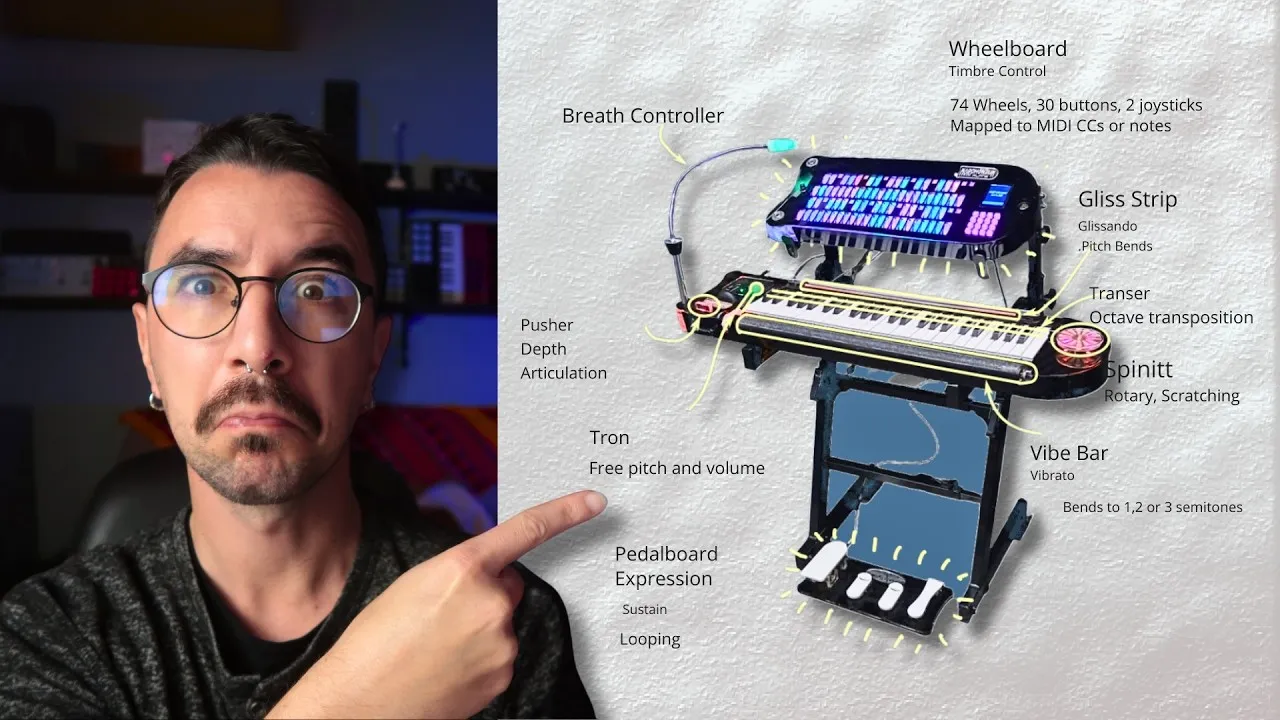
Morphonium combines a wheelboard, a keyboard with gestural controls and a pedalboard. Wheels can be moved with a finger, making it possible to arrange many continuous controls in a keyboard-like layout. The official entry frames that arrangement as a way to play timbre with the familiarity and dexterity of a keyboard.
The demonstration includes a palm-operated Vibe Bar for vibrato and calibrated pitch bends, a Gliss Strip for larger pitch movement and a theremin-like control for continuous pitch and volume. Other gestures and pedals add expression and looping functions.
I love the experimental, ongoing-invention quality of this project. It brings many control ideas into one playable system, and it shows how interface design can grow from a musician’s desire for more expression. Each input earns its place by offering a different gesture.
9. Demon Box: play with electromagnetic activity
Demon Box returns in a newer presentation after appearing in the previous year’s selection. Its system of inductors translates electromagnetic activity from nearby objects into sound, giving electrical devices and their position around the surface a musical role.
The performance is not about choosing notes on keys. It is about discovering and shaping the sonic behaviour of an object in the instrument’s sensing field. I remain enthusiastic about that idea and about the way its presentation developed. The longer Demon Box interview explores the project’s background.
10. Roto-Control: recall the physical parameter position
Roto-Control addresses a common controller problem: after switching tracks or plugins, how does the physical knob relate to the parameter now on screen? Its motorised controls provide parameter recall, and its displays identify what is being controlled.
That makes feedback part of the interface. A general-purpose MIDI controller must keep the player oriented when the assignment changes, and the demonstration highlights how motor movement and labels work together. My reaction is to that workflow and presentation, rather than an independent test of every DAW integration.
My favourites and the design lesson
Within this selection, 8ight Note stands out to me as an installation, Anukari for its approach to synthesis and Morphonium for its expansive DIY expression. Demon Box remains a favourite concept, while Roto-Control gets my commercial-controller vote in this reaction because of its physical recall and feedback.
Those are personal choices from the 2025 event, not current award results or purchasing guarantees. What lasts beyond voting is the connection between a player’s need and a concrete interaction: capture a gesture, give it a musical purpose and make its result understandable to the person playing.